- Open the Configurator program by searching for it in Start.
- Select your device (Speaker - in my case - or Digital Output) and check “Troubleshooting options“.
- Choose “Install as SFX/EFX (experimental)“.
- Restart Windows.
Thursday, February 20, 2020
FIX EQUALIZER APO NOT WORKING IN WINDOWS 10


Thursday, December 12, 2019
Fix: Audio Services Not Responding Windows 10
- Press Windows + S, type “command prompt”, right-click on the application and select “Run as administrator”.
- Once in elevated command prompt, type the following command and press Enter.
net localgroup Administrators /add networkservice
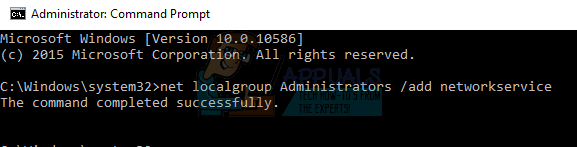
- Now type the following command and press Enter.
net localgroup Administrators /add localservice
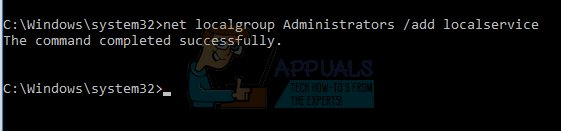
- After both the instructions are executed, type “exit” and press Enter.
- Now restart your computer and check if the problem at hand got solved.
Before this install apo and peace for audio equalizer
Sunday, December 08, 2019
How to repair Windows 10
Win key on keyboard - type cmd - run as admin:
dism.exe /online /cleanup-image /restorehealth
wait for "the operation completed succesfully"
sfc /scannow
if everything was ok, you see the next message:
Windows Resource Protection found corrupt files and successfully repaired them.
For online repairs, details are included in the CBS log file located at
windir\Logs\CBS\CBS.log. For example C:\Windows\Logs\CBS\CBS.log. For offline
repairs, details are included in the log file provided by the /OFFLOGFILE flag.
dism.exe /online /cleanup-image /restorehealth
wait for "the operation completed succesfully"
sfc /scannow
if everything was ok, you see the next message:
Windows Resource Protection found corrupt files and successfully repaired them.
For online repairs, details are included in the CBS log file located at
windir\Logs\CBS\CBS.log. For example C:\Windows\Logs\CBS\CBS.log. For offline
repairs, details are included in the log file provided by the /OFFLOGFILE flag.
Wednesday, November 27, 2019
PC: Ghost Recon Breakpoint health - how to heal wounds on PC
PC: Ghost Recon Breakpoint health - how to heal wounds on PC
Press key : Alt
Select the healing tool with mouse moovement
Press key G
Press key : Alt
Select the healing tool with mouse moovement
Press key G
Thursday, June 27, 2019
Monday, June 10, 2019
How to kill Antimalware Service Executable in Windows 10
1. To launch Windows Registry Editor, press down Windows key + R at the same time. This will open the Run window. Type in regedit and click Enter.
2. Now, follow the given path (open folders in the left registry pane in the given order): HKEY_LOCAL_MACHINE > SOFTWARE > Policies > Microsoft > Windows Defender
3. Here, try to find an entry called DisableAntiSpyware. If you cannot find it here, right-click on Windows Defender folder, select New > DWORD and then name it DisableAntispyware.
4. Double click it and change the value from 0 to 1. Confirm by clicking OK.
Wednesday, May 15, 2019
Thursday, June 29, 2017
Friday, February 17, 2017
Thursday, July 30, 2015
Windows 10 serial keys working?!
This website said it has working Windows 10 serial keys to enter during installation:
see post comment - koeyz says:
http://www.alltechbuzz.net/windows-10-product-serial-keys-technical-consumer-preview/
see post comment - koeyz says:
http://www.alltechbuzz.net/windows-10-product-serial-keys-technical-consumer-preview/
koeyz says:
koeyz says:
koeyz says:
koeyz says:
koeyz says:
Thursday, July 23, 2015
Friday, March 27, 2015
Virtual drive for Windows 10
Virtual drive for Windows 10
Tested and Working with Windows 10 64 bit version, it's an alternative for Daemon Tools Lite.
Download Virtual Clone drive for Windows 10 64 bit version:
http://virtual-clonedrive.en.softonic.com/download#downloading
Tested and Working with Windows 10 64 bit version, it's an alternative for Daemon Tools Lite.
Download Virtual Clone drive for Windows 10 64 bit version:
http://virtual-clonedrive.en.softonic.com/download#downloading
Thursday, August 14, 2014
Saturday, August 10, 2013
Friday, June 21, 2013
Highest temp evening 2013
@21:00 outside: inside: on 6/21/2013
@20:00: 33C outside; 25.7C inside at 8/09/2013
@20:00: 33C outside; 25.7C inside at 8/09/2013
Subscribe to:
Posts (Atom)