- Open the Configurator program by searching for it in Start.
- Select your device (Speaker - in my case - or Digital Output) and check “Troubleshooting options“.
- Choose “Install as SFX/EFX (experimental)“.
- Restart Windows.
Showing posts with label Windows 10 audio not working. Show all posts
Showing posts with label Windows 10 audio not working. Show all posts
Thursday, February 20, 2020
FIX EQUALIZER APO NOT WORKING IN WINDOWS 10


Thursday, December 12, 2019
Fix: Audio Services Not Responding Windows 10
- Press Windows + S, type “command prompt”, right-click on the application and select “Run as administrator”.
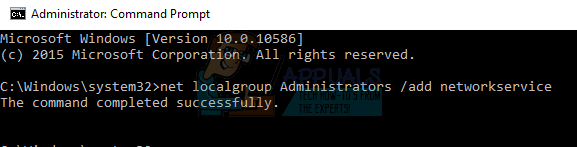
- Once in elevated command prompt, type the following command and press Enter.
net localgroup Administrators /add networkservice
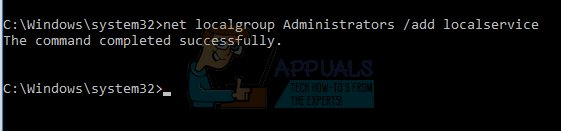
- Now type the following command and press Enter.
net localgroup Administrators /add localservice
- After both the instructions are executed, type “exit” and press Enter.
- Now restart your computer and check if the problem at hand got solved.
Before this install apo and peace for audio equalizer
Subscribe to:
Posts (Atom)